
CMDB Deployment Architecture
Architectural Overview
The CMDB application follows a standard three-tier web architecture designed for modularity:
- Frontend: A React web application served via an Nginx web server, which maps internal routing to port 80.
- Backend: A Java Vert.x application packaged as a single executable fat JAR (
cmdb-app-1.0.0-SNAPSHOT-fat.jar) running on port 8888. - Database: A PostgreSQL 15 instance storing the CMDB data.
Option 1: Single-Node Containerized Deployment
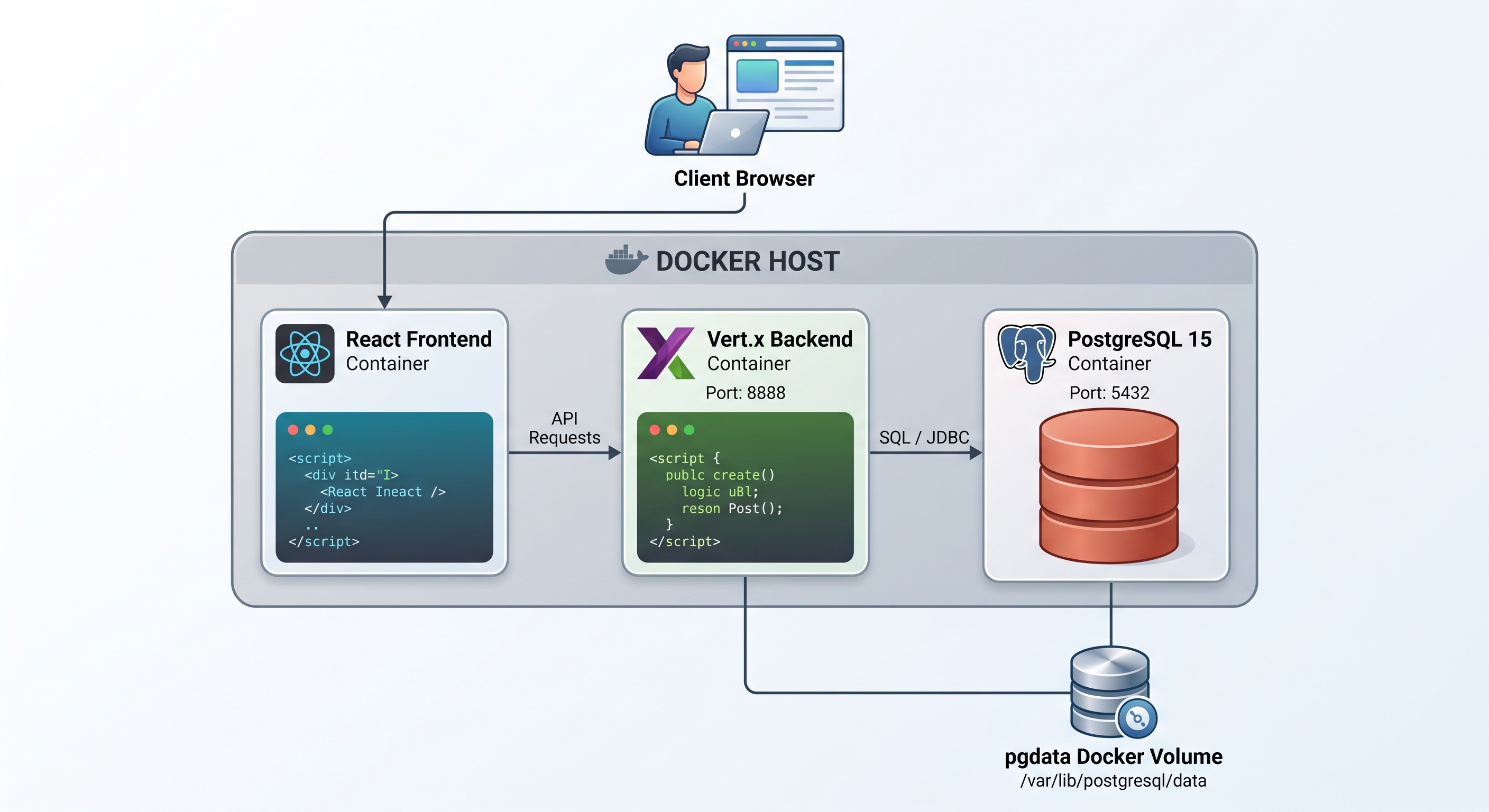
For quick provisioning or lightweight production environments, the stack can be launched via Docker Compose.
- The
docker-compose.ymlorchestrates the frontend, backend, and database in the correct dependency order. - PostgreSQL initializes its schema upon the first run using SQL scripts from the local
./db-initdirectory. - Credentials are managed using an external
.envfile.
Option 2: High Availability Scalable Deployment
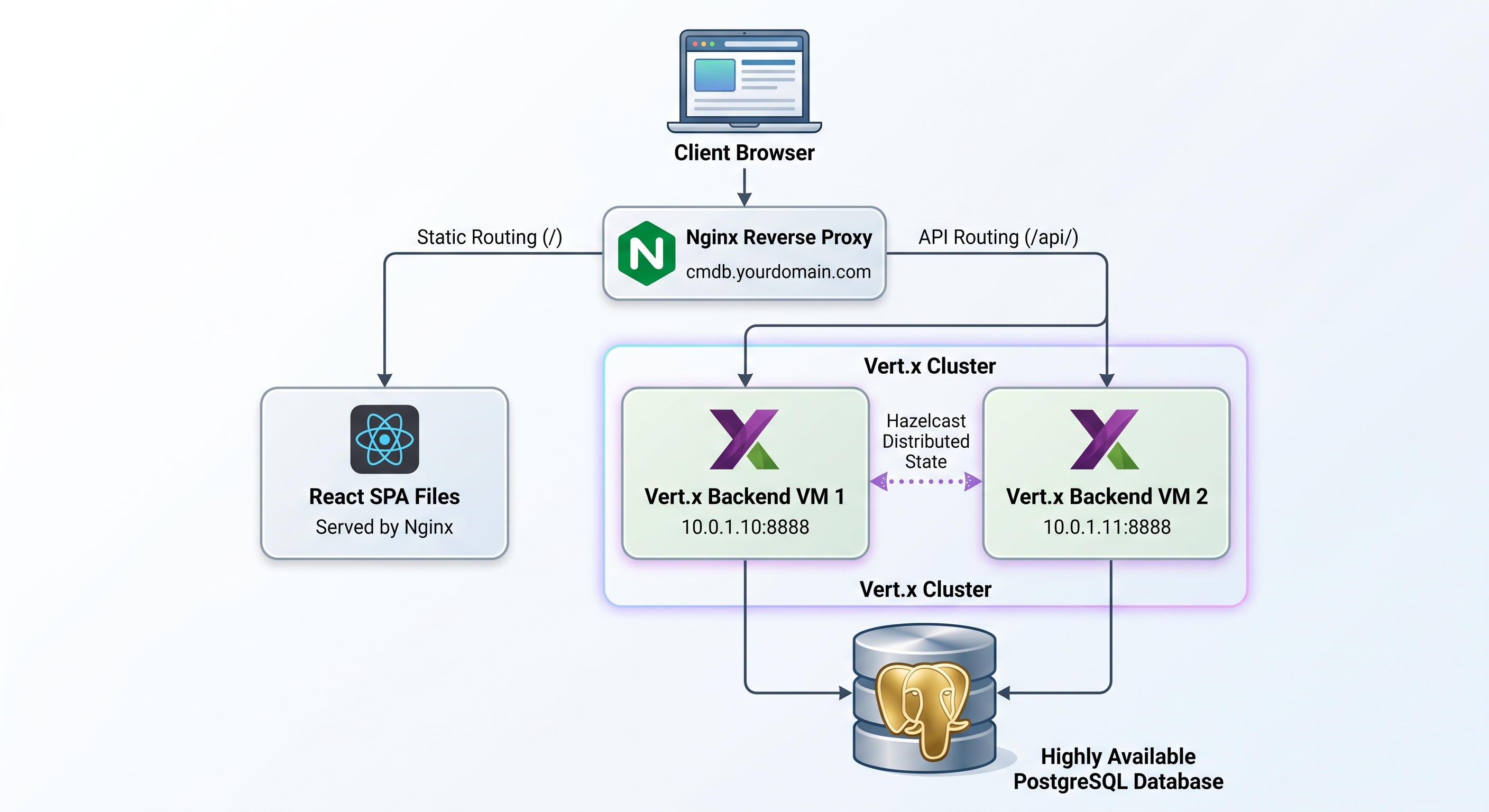
For enterprise-grade environments, the architecture scales across multiple nodes.
- Edge Routing: A reverse proxy distributes traffic across isolated React frontend nodes.
- Backend Clustering: Multiple Vert.x backend instances run behind an internal load balancer.
- Distributed State: Embedded Hazelcast libraries enable the application to form a cluster across instances, keeping data synchronized.
Option 3: Nginx Reverse Proxy (Load Balancing)
For VM-based scaling, Nginx handles incoming traffic, serves the React SPA, and load-balances API requests.
upstream cmdb_backend {
    server 10.0.1.10:8888;
    server 10.0.1.11:8888;
}

server {
    listen 80;
    server_name cmdb.yourdomain.com;

    location /api/ {
        proxy_pass http://cmdb_backend;
        proxy_set_header Host $host;
        proxy_set_header X-Real-IP $remote_addr;
        proxy_set_header X-Forwarded-For $proxy_add_x_forwarded_for;
    }

    location / {
        root /usr/share/nginx/html;
        index index.html index.htm;
        try_files $uri $uri/ /index.html;
    }
}
Option 4: Kubernetes Orchestration
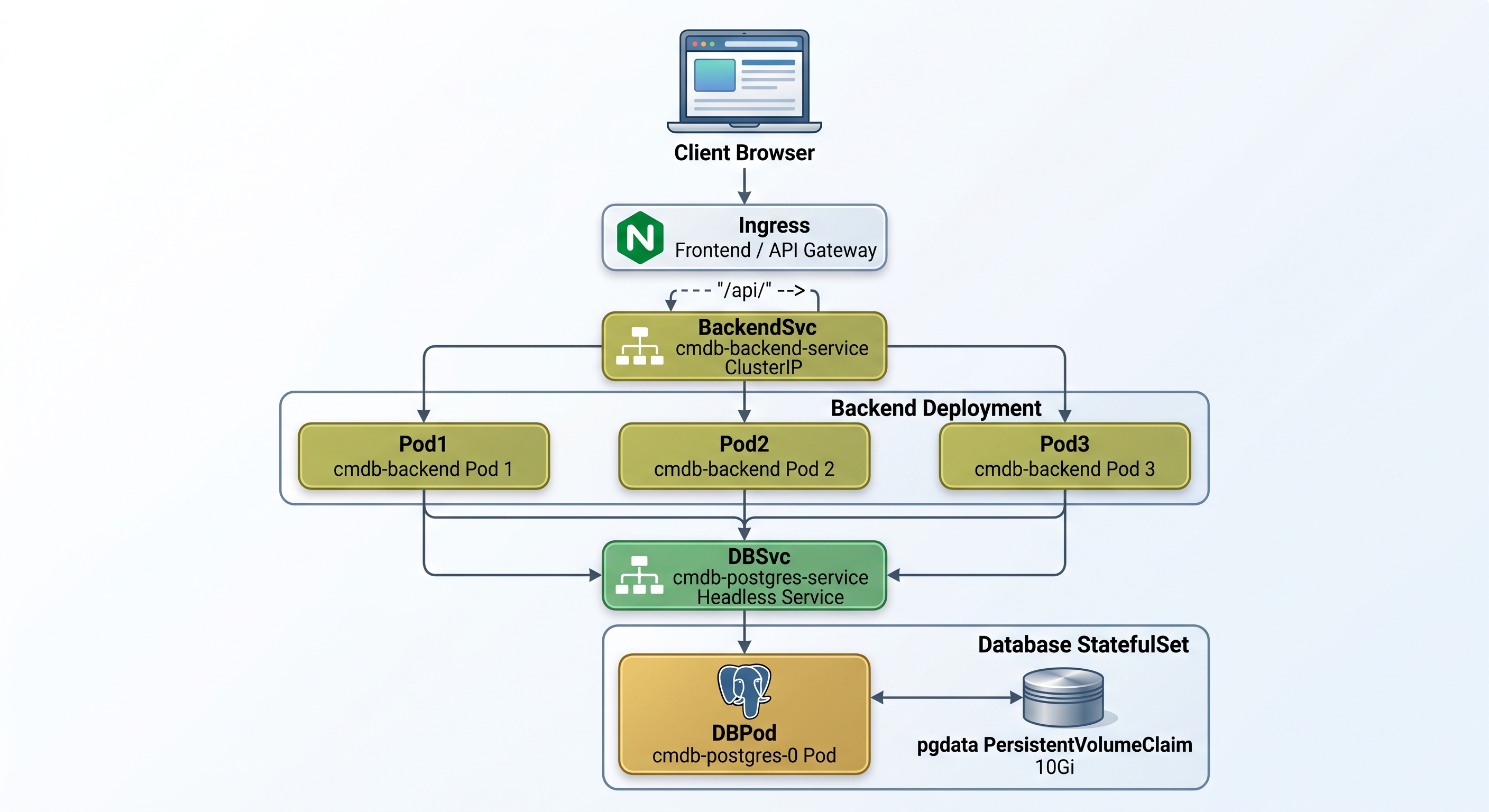
For cloud-native scaling, Kubernetes allows you to manage the backend horizontally and the database persistently.
Backend Deployment & Service This configuration defines a Deployment with 3 replicas for high availability and a Service to expose them internally.
apiVersion: apps/v1
kind: Deployment
metadata:
  name: cmdb-backend
spec:
  replicas: 3
  selector:
    matchLabels:
      app: cmdb-backend
  template:
    metadata:
      labels:
        app: cmdb-backend
    spec:
      containers:
      - name: cmdb-backend
        image: your-registry/cmdb-backend:1.0.0
        ports:
        - containerPort: 8888
        env:
        - name: DB_HOST
          value: "cmdb-postgres-service"
---
apiVersion: v1
kind: Service
metadata:
  name: cmdb-backend-service
spec:
  type: ClusterIP
  selector:
    app: cmdb-backend
  ports:
  - port: 8888
    targetPort: 8888
Database StatefulSet
Stateful applications like PostgreSQL require a StatefulSet combined with a headless Service to ensure stable network identities and persistent storage via volume claims.
apiVersion: v1
kind: Service
metadata:
  name: cmdb-postgres-service
  labels:
    app: cmdb-postgres
spec:
  clusterIP: None
  ports:
  - port: 5432
    targetPort: 5432
  selector:
    app: cmdb-postgres
---
apiVersion: apps/v1
kind: StatefulSet
metadata:
  name: cmdb-postgres
spec:
  serviceName: "cmdb-postgres-service"
  replicas: 1
  selector:
    matchLabels:
      app: cmdb-postgres
  template:
    metadata:
      labels:
        app: cmdb-postgres
    spec:
      containers:
      - name: postgres
        image: postgres:15
        ports:
        - containerPort: 5432
        env:
        - name: POSTGRES_DB
          value: "cmdb"
        - name: POSTGRES_USER
          value: "cmdb_user"
        - name: POSTGRES_PASSWORD
          valueFrom:
            secretKeyRef:
              name: db-credentials
              key: password
        volumeMounts:
        - name: pgdata
          mountPath: /var/lib/postgresql/data
  volumeClaimTemplates:
  - metadata:
      name: pgdata
    spec:
      accessModes: [ "ReadWriteOnce" ]
      resources:
        requests:
          storage: 10Gi
Database & Storage Considerations
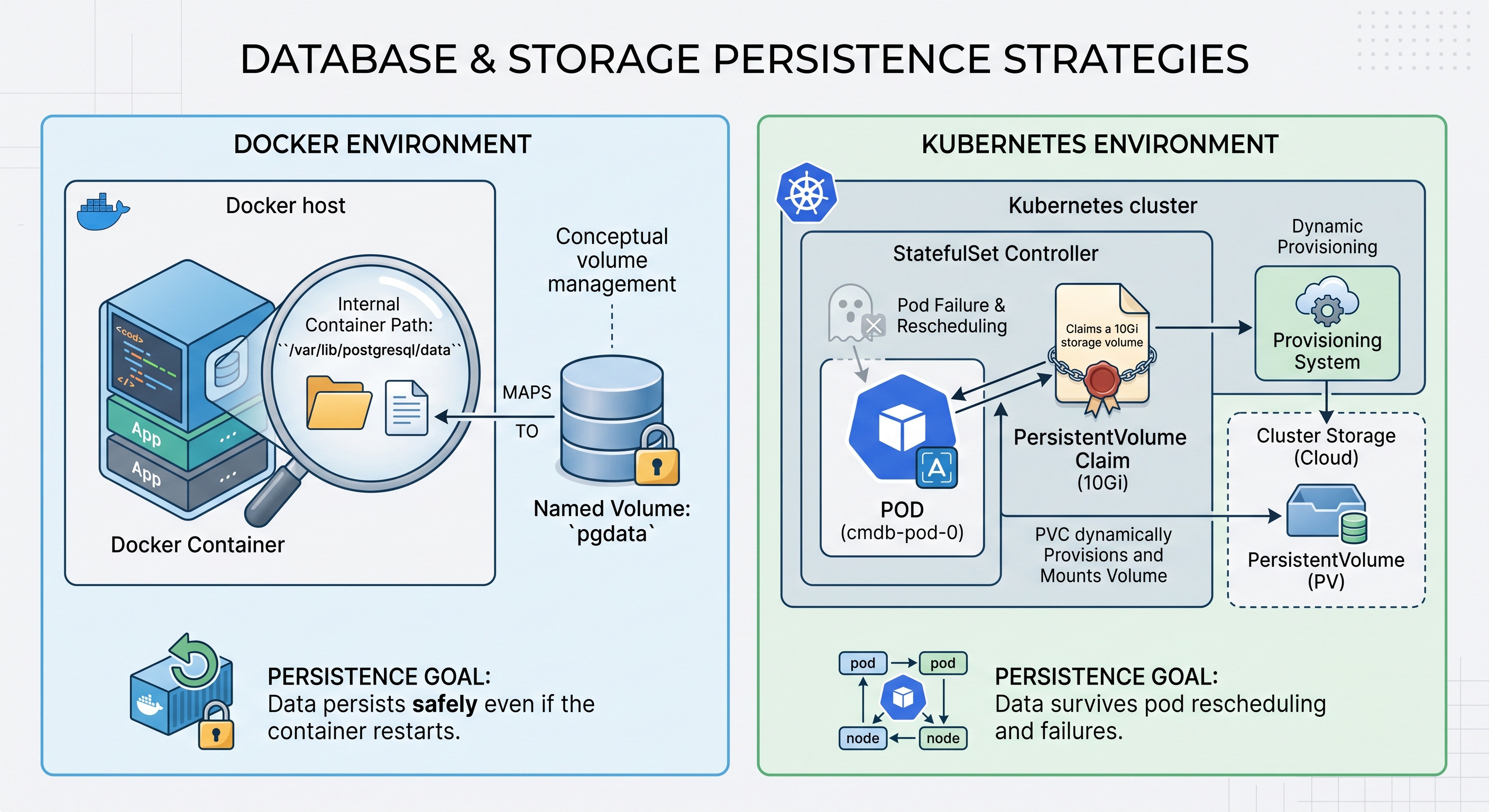
Stateful data requires strict persistence strategies, regardless of the chosen deployment topology.
- Docker Environments: The setup utilizes a dedicated named volume (
pgdata) mapped to/var/lib/postgresql/datato guarantee CMDB data persists safely even if the container restarts. - Kubernetes Environments: The StatefulSet dynamically provisions a 10Gi
PersistentVolumeClaimto ensure data survives pod rescheduling and failures.